Coming soon. PokerCommand is not released yet — it will be available on Microsoft Store shortly. Email us and we'll let you know when it's out.
Den här sidan finns på svenska. Visa på svenska →
PokerCommand
Tournament manager for Windows

Run the whole tournament. Play the cards.

PokerCommand handles the blind clock, seating, table breaks, bounties and payouts — and puts a big, clear player screen on your TV or second monitor. Built for home games and clubs — from a single table to 100 players and more.

Windows 10 & 11 One-time purchase Works offline English & Swedish — one click to switch
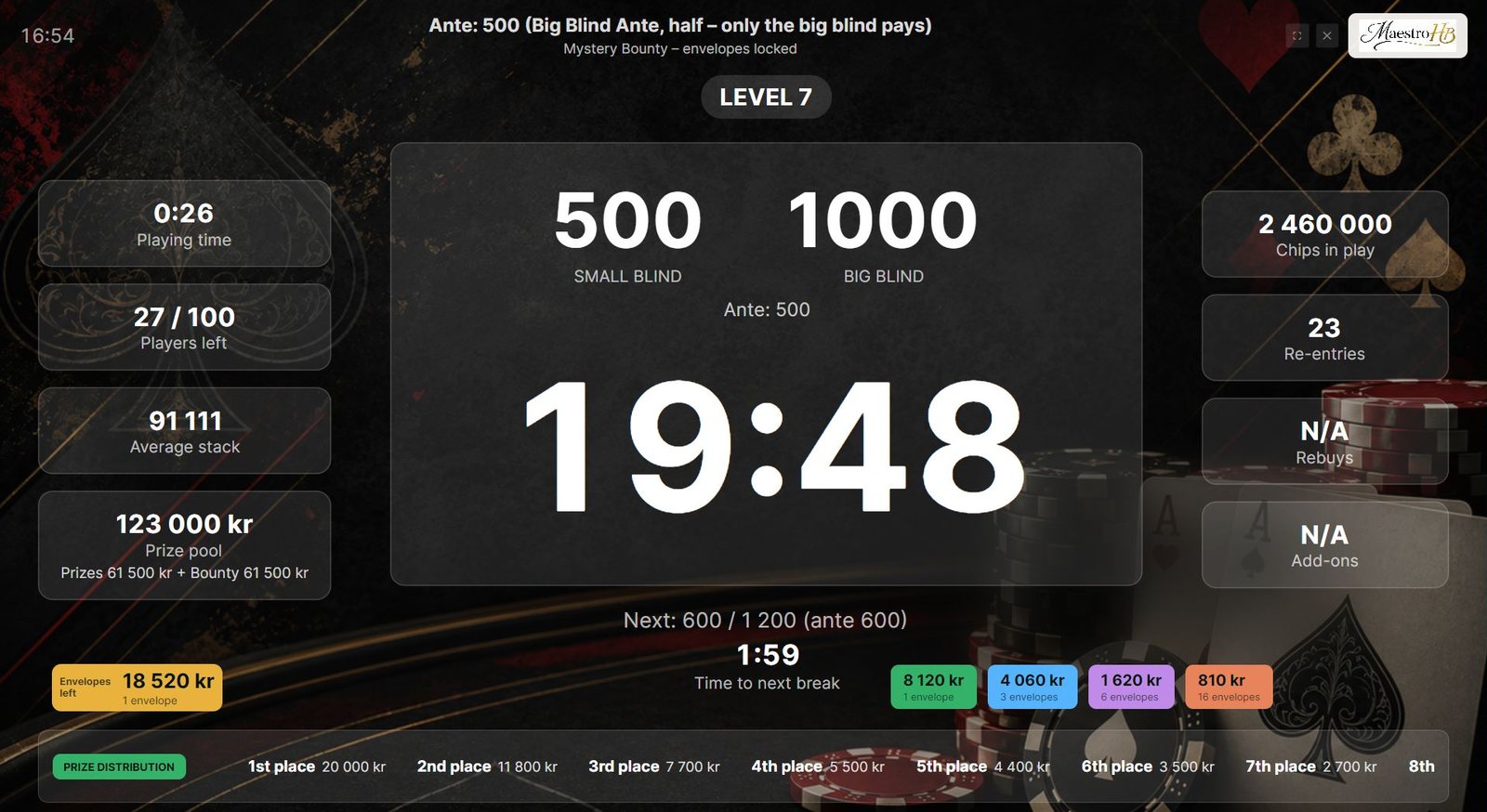
PokerCommand player screen in a Mystery Bounty tournament: level 7, blinds 500/1000, 19:48 left on the clock, 27 of 100 players left, envelopes and prize distribution at the bottom
The player screen — on a TV, projector or second monitor
The player screen

Everyone at the table knows what's going on

Blinds, time, players left and stacks — readable from across the room. When a table breaks or the tournament ends, the screen tells the players what they need to know.

New table seatingWhen a table breaks, every moved player sees exactly where to go — from table and seat, to table and seat.
The clockCurrent and next level, time to the next break, average stack and prize pool — plus Mystery Bounty envelopes and the prize distribution when you want them shown.
Top 10The final standings, ready to celebrate the winner.
For the tournament director

Your side of the screen

While players watch the big screen, you run the tournament from the laptop: start the clock, handle eliminations and buy-ins, and keep the tables balanced.

Quick start & templatesPlayers, buy-in and starting stack — then draw seats. Save the whole setup as a template for next time.
Tables & eliminationsEvery table and seat at a glance. Drag players between tables, send the draw to the player screen, and undo a mistake.
Clock controlsStart, pause, ±1 minute, skip levels — all with keyboard shortcuts, even in single-screen mode.
Setup in minutes

A guide that asks the right questions

The startup guide walks you through the tournament step by step, with sensible defaults already filled in. Need more control? The built-in calculators do the maths.

The basicsPlayers, buy-in, starting stack and a template. Everything else has defaults.
Type & buy-insFreezeout, PKO or Mystery Bounty — plus re-entry, rebuy, add-on and late registration.
Blind structureReview the levels and total playing time before you start.
Blind calculatorTell it how long you want to play — it builds the structure, breaks included.
Prize calculatorA payout table in round numbers, adjustable row by row.
Features

Everything the tournament director does — in one app

Start with a template in under a minute, or fine-tune every detail. PokerCommand keeps track so you can keep playing.

⏱

Blind clock & structures

Turbo, standard, deepstack and home-game templates — or let the app build a structure from starting stack, player count and how long you want to play.

▣

Player screen for TV or monitor

A large, high-contrast display with level, time, blinds, players left, average stack and prize pool — readable from across the room.

♠

Seating & table breaks

Random seat draw, table breaks where you choose which table goes, and automatic consolidation to the final table — following TDA practice.

↺

Rebuys, re-entries & add-ons

Set purchase periods tied to levels and breaks. The app warns you before a limit passes, so nobody buys in when they shouldn't.

◎

Bounties & Mystery Bounty

Progressive knockouts and Mystery Bounty envelopes, with bounty payouts kept separate from the main prize pool.

$

Prize pool & payouts

Automatic prize pool and payout suggestions in round numbers, in your own currency — or in points.

★

Ranking series

Run a league across several evenings. Points per placement and participation, standings, and PDF or CSV export.

⛨

Nothing gets lost

The tournament is saved as you go and resumes where it stopped. Undo a mistaken elimination, and back up your templates and series.
Your setup

Two screens or one — your choice

Two screens

Laptop + TV or monitor

Manage players, tables and payouts on the laptop while the TV or second monitor shows the player screen. Players see only what they need; you see everything.

Single screen

Just one computer

No second display? Single-screen mode switches between the player view and your controls, with keyboard shortcuts that work from both.

Pricing

Try everything free for 30 days

Then a single one-time purchase. No subscription, no account.

  • Full functionality during the trial
  • One product — no feature tiers
  • Bought and updated through Microsoft Store
  • Works without an internet connection
Get it from Microsoft Store

Price is shown in your local currency on Microsoft Store.

FAQ

Good to know

How many players can it handle?

From a single table at home to club tournaments with 100 players or more across a dozen tables. Seating, table breaks and balancing to the final table are handled for you, however many tables you run.

Do I need internet during the tournament?

No. Everything runs locally on your computer. You only need a connection to download the app and for Microsoft Store to confirm your licence now and then.

What happens when the trial ends?

The app asks you to buy it through Microsoft Store. Your templates and saved series stay on your computer.

What happens to my data if I uninstall?

Windows deletes the app's data when you uninstall it — templates, saved tournaments and ranking series included. Before you uninstall or move to a new computer, use File → Back up templates and series in the app, and File → Restore from backup afterwards.

Where do I find the app after installing?

In the Start menu. No desktop shortcut is created. Right-click PokerCommand and choose Pin to taskbar or Pin to Start, or drag it from All apps to the desktop.

Can I install it on more than one computer?

Yes. The licence follows your Microsoft account, so you can install PokerCommand on your other Windows computers signed in with the same account without buying it again.

Does it run on Mac or mobile?

Not at the moment. PokerCommand is a Windows desktop app.

Which languages are supported?

English and Swedish. On first start the app follows your Windows language, and you can switch any time with one click on the language toggle at the top of the window — the manual and the player screen switch too.

Is there a manual?

Yes — a searchable manual is built into the app and can be exported as PDF.

From the same maker

Poker och annat English & Swedish

Free odds calculators, a nine-part poker crash course from outs to ICM, and more poker apps — for recreational players who want to get a little sharper.

Visit Poker och annat →
Support

Found a bug or have an idea?

Write to us. For bug reports, use Copy technical info in the app's About box and paste it into your email — it helps a lot.

support@pokercommand.com